
In today’s digital age, small businesses must compete with larger enterprises to capture online visibility and drive revenue. One of the most powerful advertising tools available is Google Display Ads. Many small business owners wonder whether investing in display ads is worth the effort. In this comprehensive guide, we explore how Google Display Ads can provide substantial benefits for small businesses when implemented strategically.
What Are Google Display Ads?
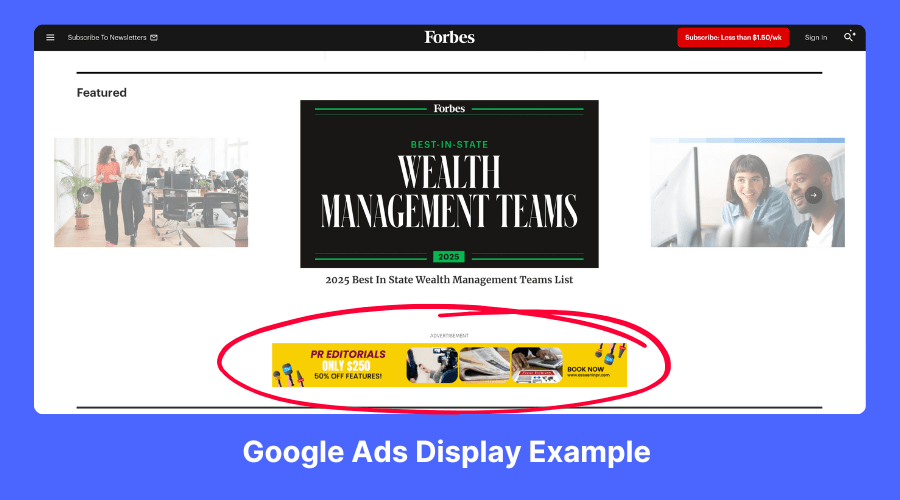
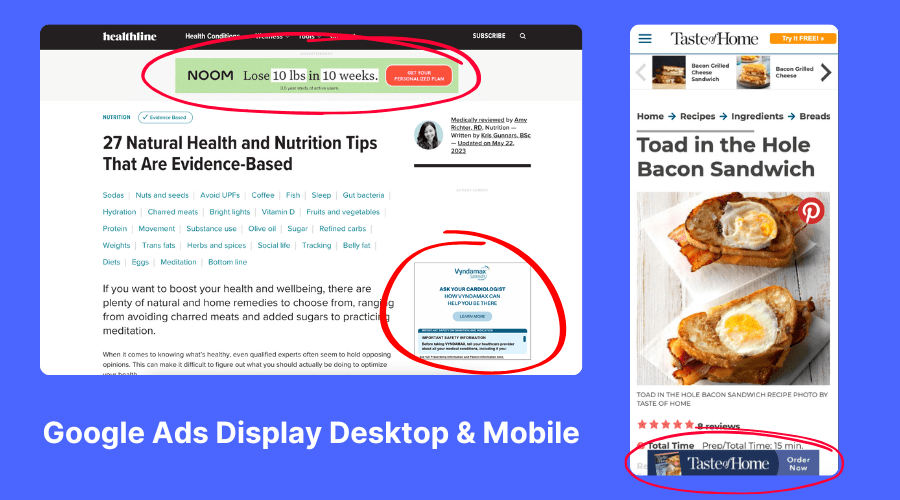
Google Display Ads are a form of pay-per-click (PPC) advertising that appears on websites within the Google Display Network. This Displau network allows advertisers to reach over two million websites, apps, and videos, reaching more than 90% of internet users worldwide. Display ads can take various forms, including banner ads, text ads, and rich media, designed to capture the attention of potential customers.
Key Benefits of Google Display Ads for Small Businesses
1. Increased Brand Awareness
One of the primary advantages of Google Display Ads is their ability to boost brand visibility. Unlike search ads that only appear when users actively search for specific keywords, display ads are shown across websites related to your industry. This passive exposure helps small businesses stay top-of-mind for their target audience, even when consumers aren’t actively searching for products or services.
For example, a local bakery can place visually appealing banner ads on food blogs or recipe websites, ensuring that food enthusiasts become familiar with its brand.
2. Advanced Targeting Options
Google Display Ads offer a range of targeting options to ensure your ads reach the most relevant audience. Some of the key targeting methods include:
- Audience Demographic Targeting: Here you can decide who will see you ads based on chosen specific gender, age, or even income range for example.
- Interest-Based Targeting: Target users who have shown interest in related topics.
- Remarketing: Re-engage visitors who have already interacted with your website but didn’t complete a desired action, such as making a purchase.
This level of customization makes it easier for small businesses to maximize their advertising budget by targeting users who are most likely to convert.
3. Cost-Effective Advertising
Contrary to popular belief, Google Display Ads can be highly cost-effective for small businesses. It uses the same pay-per-click model as any Search campaigns, which means you only pay when someone clicks on your ad. Keep in mind that CPC for Display Ads are usually much lower than for Search Ads. In addition, you have the possibility to set a daily budget and a maximum cost-per-click (CPC) to make sure you keep some control over your spendings.
With proper optimization, display ads can deliver an excellent return on investment (ROI). Tools like Google’s Smart Bidding help automate bidding strategies to maximize conversions while staying within your budget.
4. Eye-Catching Visuals and Ad Formats
Google Display Ads allow for visually engaging ad formats that capture user attention. Small businesses can use:
- Static image ads: Simple and effective for quick brand recognition.
- Responsive display ads: Automatically adjust size, appearance, and format to fit different spaces.
- Video ads: Perfect for dynamic storytelling.
By creating visually appealing ads, small businesses can leave a lasting impression that leads to higher engagement and conversions.
Best Practices for Small Businesses Using Google Display Ads
1. Define Clear Goals
At the begining of any successful digital marketing intiative, there is a step dedicated to identifiying specific target objectives. You will need to do this before you think about creating your display ad campaigns, it’s crucial to set clear objectives. Whether your goal is to increase website traffic, boost brand awareness, or drive sales, having a well-defined purpose helps shape your strategy and measure success effectively.
2. Use Compelling Visuals and Messaging
High-quality images and engaging ad copy are essential for capturing attention. Use professional visuals and ensure that your messaging is clear, concise, and aligned with your brand’s tone.
Tips for creating compelling ads:
- An impactful call-to-action (CTA) focusing on triggering emotions from the user, such as “Get Your Free Quote” or “Shop Now.” creating urgency, is highly recommended.
- Highlight unique selling points (USPs), like free shipping or limited-time offers.
3. Leverage Remarketing Campaigns
Remarketing is the technical term given to a campaign that allows you to remarket or reconnect with users who have already engaged with your brand, for example visited your website. This tactic is highly effective for nurturing leads and driving repeat visitors back to complete a purchase. Dynamic remarketing ads can even display personalized products or services based on a user’s browsing behavior.
4. Optimize for Mobile Devices
Since a significant portion of internet users browse on mobile devices, ensure your display ads are mobile-friendly. Use responsive ad formats that adapt to different screen sizes and prioritize fast-loading visuals to enhance user experience.
5. Monitor and Refine Your Campaigns
Regularly analyzing performance metrics is key to successful advertising. Google Ads provides insights into:
- Click-through rates (CTR)
- Conversion rates
- Cost per conversion
Use this data to identify what’s working and make necessary adjustments. Split-testing different ad creatives and targeting methods can further improve results.
Ready to create your first Google Ads Display campaigns? Set, go follow the guide.
Common Challenges and How to Overcome Them
Despite the benefits, running display ads comes with challenges. Here’s how small businesses can address them:
Challenge 1: Low Click-Through Rates (CTR)
Solution: Enhance your ad design with more engaging visuals and refine your targeting to ensure your ads reach a more relevant audience.
Challenge 2: High Cost per Click (CPC)
Solution: Utilize Smart Bidding strategies and focus on remarketing campaigns to target warm leads who are more likely to convert.
Challenge 3: Ad Fatigue
Solution: Rotate your creatives regularly and experiment with new messaging to keep your audience interested.
Conclusion
Mastering Google Ads Display requires strategic planning, precise targeting, and continuous optimization. By following the steps outlined in this guide, your business can harness the power of display advertising to drive awareness, engagement, and conversions.
FAQ – Can Google Display Ads Work for Small Businesses
Are Google Display Ads expensive for small businesses?
No, Google Display Ads can be very cost-effective. You control your budget by setting daily limits and choosing maximum bids. Smart Bidding strategies also help optimize spending to maximize results.
How do I know if my display ads are working?
You can measure success by tracking key performance metrics like click-through rates (CTR) and how to increase it, conversion rates, and cost per conversion. Google Ads provides detailed reports to help analyze and refine your campaigns.
Can Google Display Ads target local customers?
Yes, you can use location-based targeting to display ads to people in specific geographic areas, making it ideal for small businesses targeting local customers.
What types of businesses benefit the most from Google Display Ads?
Any business seeking brand awareness or product visibility can benefit. Retailers, service providers, and e-commerce stores often see strong results from display advertising.
How can I create visually appealing ads on a budget?
Use free or low-cost design tools like Canva to create professional-looking ads. Google’s responsive display ad format also simplifies the design process by automatically adjusting images and text to fit different placements.